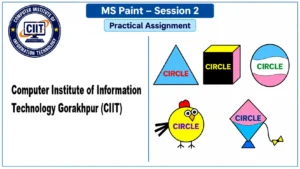
MS Paint Session 2 AssignmentThis practical assignment is designed to help students practice basic shapes and text writing in Microsoft Paint. In this activity, students will open their saved MS Paint file, work with different figures, and write the word “CIRCLE” inside the given figures.
Institute: Computer Institute of Information Technology (CIIT)
Topic: MS Paint – Shapes and Text Practice
Session: 2
Practical Questions
Q.1. Open your saved MS Paint file which you created yesterday.
Q.2. Write CIRCLE inside the given figures using MS Paint.
Q.3. Practice writing CIRCLE inside the following figures:
- Triangle Figure
- Cube Figure
- Oval Figure
- Bird Figure
- Kite Figure
Q.4. Make sure the word CIRCLE is written neatly inside each figure.
Q.5. Save your completed drawing in MS Paint.
Instructions
- Complete all the questions practically.
- Open your previous MS Paint file before starting.
- Write CIRCLE clearly inside each figure.
- Keep your work neat and clean.
- Save your completed work properly.
- Show your completed drawing to your teacher.
Learning Objective
To develop basic MS Paint skills, improve mouse control, drawing practice, shape handling, and text-writing skills.